Add a Textbox to your form
Position and size it to it's maximum size.
Make note of the width of the textbox when you are done.
Add the following code to your form Initialize event.
TextBox1.Width = 0
TextBox1.BackColor = vbBlue '(or the color of your choice)
Now in the procedure for which you want to show progress, follow this:
Divide the width of the textbox by the number of iterations, this is the amount by which the progress bar will grow for each iteration.
Then in your iteration loop, increment the width of the textbox by the above result.
Here is an example.
Private Sub CommandButton1_Click()
Dim i As Integer, x As Double
Dim num As Integer, start As Double
num = 150 '(this will typically be a variable in your procedure)
x = 206 / num
For i = 1 To num
'-------------------------------
' this dummy code is just to give
' the progress bar time to work
' in this example
    start = Timer
    Do While Timer < start + 0.02
        DoEvents
    Loop
' end dummy code
'-------------------------------
' This changes the progress bar
    TextBox1.Width = i * x
Next i
End Sub
num will typically already be in your procedure as the number of items in a collection or array that you are processing.
x is the width of the textbox divided by num
For i = 1 to num is just a sample loop. You will have your own.
Setting the textbox width to i * x at each iteration is what makes the "Progress Bar" actually work as shown below.
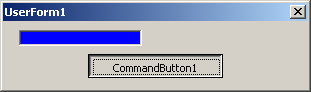
I received a very good comment from Nick Zeeben. "...the DoEvents inside the loop is rather cruical to allowing windows to break in and repaint the dialog otherwise the progress bar doesnt have a chance to redraw."
Thanks Nick.
Labels: Programming
PermaLink Posted 5/30/2006 08:12:00 PM Comments (3)
24 May 2006
Rapid acceptance
Autodesk Announces Rapid Acceptance of Autodesk Inventor 11
Rapid acceptance, what does this mean? Someone placed a huge new order yesterday, or that they just converted a few shops from the competition?
What are they going to say...? "sales are slow, please buy some..."?
The whole PR could have been summed up in one sentence - "We're Autodesk, we're doing well, thank you..."
PermaLink Posted 5/24/2006 07:38:00 AM Comments (0)
Rapid acceptance, what does this mean? Someone placed a huge new order yesterday, or that they just converted a few shops from the competition?
What are they going to say...? "sales are slow, please buy some..."?
The whole PR could have been summed up in one sentence - "We're Autodesk, we're doing well, thank you..."
Labels: Notices
PermaLink Posted 5/24/2006 07:38:00 AM Comments (0)
19 May 2006
Repair your install
At some point in time you may be required to run a repair on your AutoCAD (or other Autodesk product) installation. This is generally required if you UNinstall one version of an application after installing another version. For example, if you install Land Desktop 2006 then later on UNinstall Land Desktop 2005, you must run a repair on your 2006 install.
If you have any unexplained errors that cannot be solved by other methods, such as commands that stop working, a repair may be required also.
Here's how to do it...
The rest of the prompts should be self-explanatory. If you original install from a CD or DVD, you will be prompted for the media. If your install from from a network deployment, you must have access to the unaltered copy of said deployment.
PermaLink Posted 5/19/2006 01:03:00 PM Comments (0)
If you have any unexplained errors that cannot be solved by other methods, such as commands that stop working, a repair may be required also.
Here's how to do it...
- Open the Control Panel, then find the application on which to run the repair.

- Click the Change button.
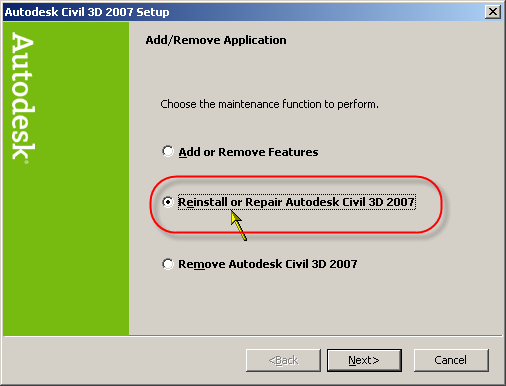
- On the next screen, choose Reinstall or Repair, then the Next button.

- On the next screen, choose Repair errors in my...

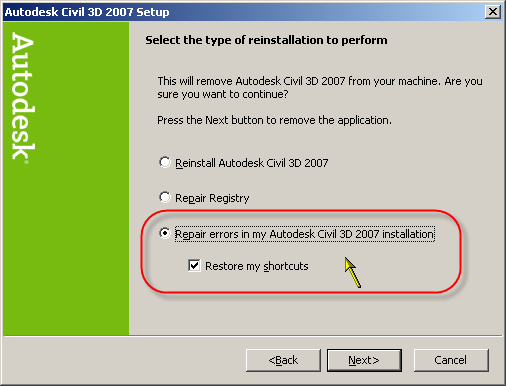
The rest of the prompts should be self-explanatory. If you original install from a CD or DVD, you will be prompted for the media. If your install from from a network deployment, you must have access to the unaltered copy of said deployment.
PermaLink Posted 5/19/2006 01:03:00 PM Comments (0)
09 May 2006
Software pirate gets 35 months
He pirated Autodesk products among others...
PermaLink Posted 5/09/2006 04:16:00 PM Comments (0)
Labels: Piracy
PermaLink Posted 5/09/2006 04:16:00 PM Comments (0)