Updated as of Tuesday @ 3:15pm
PermaLink Posted 11/28/2005 11:44:00 AM Comments (1)
22 November 2005
Launch PDF from AutoCAD
If you need the ability to launch a PDF file from a menu macro, lisp file, or VBA routine, check out the code shown below. This will launch the PDF using the default registered application, just as if you had entered the file name in the Windows Start-Run dialog
This avoids any browser related issues which can arise if you use the AutoCAD "BROWSER" command.
It makes no assumptions regarding the application (or it's version) used to open a PDF document, or the presence of a properly configured PGP file.
PermaLink Posted 11/22/2005 02:00:00 PM Comments (3)
This avoids any browser related issues which can arise if you use the AutoCAD "BROWSER" command.
It makes no assumptions regarding the application (or it's version) used to open a PDF document, or the presence of a properly configured PGP file.
;;;==============================
;;;       LISP EXAMPLE
;;;==============================
(defun C:LaunchPDF (/ shell)
  (vl-load-com)
  (setq filename "\\\\server\\share\\mydoc.pdf")
  (setq shell
  (vla-getinterfaceobject
    (vlax-get-acad-object)
    "Shell.Application"
  )
  )
  (vlax-invoke-method shell 'Open filename)
  (vlax-release-object shell)
)
'================================
'      VBA EXAMPLE
'================================
Private Sub LaunchPDF()
  Dim fn As String, objShell As Object
  fn = "\\server\share\mydoc.pdf"
  Set objShell = CreateObject("Shell.Application")
  objShell.Open (fn)
  Set objShell = Nothing
End Sub
Labels: pdf, Programming, Tips
PermaLink Posted 11/22/2005 02:00:00 PM Comments (3)
11 November 2005
AutoCAD 2006 View Transitions
This is the one new addition to 2006 that most of my users either really love or really dislike. On the other hand, I don't really care one way or the other since I do 99% of my zooming and panning with the mouse scroll button. I leave my View Transitions turned on with the default settings as shown here. The command name to access this dialog is VTOPTIONS.
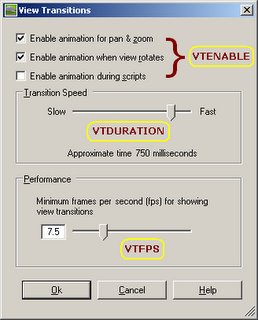
I suspect the users who dislike view transitions might not mind if the duration of the transition was shortened. I've had a chance to play with Inventor 10, and noticed the same type of view transitions. I suspect Inventor had this feature first. Feel free to let me know.
Like a lot of things in AutoCAD, there are ways to control these options without having to locate and execute the dialog. This can be helpful if you want to control these settings in a script, macro, or other customization routine. These system variables are described below.
PermaLink Posted 11/11/2005 01:00:00 PM Comments (6)
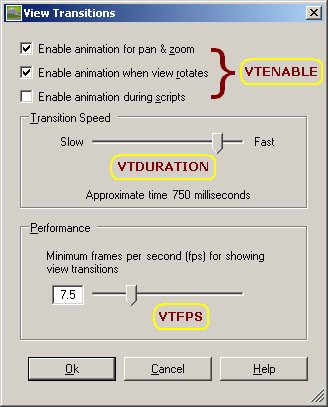
I suspect the users who dislike view transitions might not mind if the duration of the transition was shortened. I've had a chance to play with Inventor 10, and noticed the same type of view transitions. I suspect Inventor had this feature first. Feel free to let me know.
Like a lot of things in AutoCAD, there are ways to control these options without having to locate and execute the dialog. This can be helpful if you want to control these settings in a script, macro, or other customization routine. These system variables are described below.
- VTENABLE - The default value is 3. See the help file for a table showing the meaning of each valid value, 0 through 7.
- VTDURATION - Specify the duration of a view transition, in milliseconds.
- VTFPS - Specify the minimum speed of a view transition, in frames per second.
PermaLink Posted 11/11/2005 01:00:00 PM Comments (6)
02 November 2005
Configuring DWG TrueView
This post is to expand on the tips over at JTB World regarding the silent install of DWG TrueView. Specifically, the tip below covers automation of the configuration.
If you need to add to the support file search path, you should keep the existing paths but since they are tailored to each user how do account for this?
I have found that you can substitute windows environment variables in the support file search path. For example, %appdata% instead of "C:\Documents and Settings\very_long_username\Application Data" and %programfiles% for "C:\Program Files".
If you are creating a REG file to import to other machines, use these variables in your REG file. My example REG file can be downloaded here.
PermaLink Posted 11/02/2005 04:00:00 PM Comments (1)
If you need to add to the support file search path, you should keep the existing paths but since they are tailored to each user how do account for this?
I have found that you can substitute windows environment variables in the support file search path. For example, %appdata% instead of "C:\Documents and Settings\very_long_username\Application Data" and %programfiles% for "C:\Program Files".
If you are creating a REG file to import to other machines, use these variables in your REG file. My example REG file can be downloaded here.
Labels: Viewers
PermaLink Posted 11/02/2005 04:00:00 PM Comments (1)