For AutoCAD, submit your wish to the official AUGI Wish List. - Here is how it works. - Also, read about the current status of the wishlist.
For AutoCAD and other products, check out the Autodesk Beta and Feedback program, and the Product Feedback page.
PermaLink Posted 10/24/2005 06:00:00 PM Comments (0)
Free DWG Viewer [Part 2]
After installing the new DWG TrueView, I realized something. This is nothing more than the DWG viewer that comes with DWF Composer. (In fact, you cannot install DWG TrueView until the remove the DWG viewer that comes with DWF Composer).
You can open, view and plot, and that's about it.
No measuring capabilities.
Many firms want to provide an application for non-CAD users to view DWG files and allow for simple linear and area measurements. Free is not even a requirement.
So it looks like we have three choices.
Make your own conclusions using the viewer comparison.
BTW - If you turn off the command linein DWG TrueView, I don't see any way to get it back. The warning message tells you that Ctrl+9 will do it, but it doesn't. Oh well, you don't need it anyway.
PermaLink Posted 10/24/2005 11:45:00 AM Comments (2)
You can open, view and plot, and that's about it.
No measuring capabilities.
Many firms want to provide an application for non-CAD users to view DWG files and allow for simple linear and area measurements. Free is not even a requirement.
So it looks like we have three choices.
- DWF Composer - User (remember, a non-CAD user) must open DWG file in the included DWG viewer, then publish to DWF. Then open DWF in Composer to measure.
- AutoCAD LT - Way overkill. These non-CAD users do not need all the functionality of LT
- Third Party - Bentley View is one of many third party apps that can open DWG and provide tools for linear and area measurements.
Make your own conclusions using the viewer comparison.
BTW - If you turn off the command linein DWG TrueView, I don't see any way to get it back. The warning message tells you that Ctrl+9 will do it, but it doesn't. Oh well, you don't need it anyway.
Labels: Viewers
PermaLink Posted 10/24/2005 11:45:00 AM Comments (2)
20 October 2005
Free DWG Viewer
It's finally here.
Autodesk has released a new free .DWG file viewer.
Announcement | DWG Trueview
PermaLink Posted 10/20/2005 03:44:00 PM Comments (0)
Autodesk has released a new free .DWG file viewer.
Announcement | DWG Trueview
Labels: Viewers
PermaLink Posted 10/20/2005 03:44:00 PM Comments (0)
14 October 2005
Keeping up with your CAD Blogs
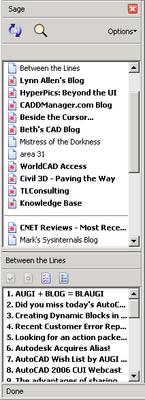
How do you keep up with all the CAD blogs? If you use Firefox, you might want to look at an extension called Sage. With one click of the refresh button, all your subscribed feeds are updated and ready to view. Updated feeds names are listed BOLD, so you can navigate right to the fresh information.
Setting up is easy. Install Sage, and then just drag and drop the little icon onto the Sage panel. For Blogger accounts, you can add the URL http://<address_of_blog>/atom.xml
If you prefer a newsreader format, Thunderbird is also equipped for RSS/Atom feeds. Just add a new account as if you were adding an email account, but choose RSS News & Blogs. After the account is created, simply drag and drop the little icon, or add your feed URL's manually.
PermaLink Posted 10/14/2005 07:31:00 AM Comments (0)
Setting up is easy. Install Sage, and then just drag and drop the little
 icon onto the Sage panel. For Blogger accounts, you can add the URL http://<address_of_blog>/atom.xml
If you prefer a newsreader format, Thunderbird is also equipped for RSS/Atom feeds. Just add a new account as if you were adding an email account, but choose RSS News & Blogs. After the account is created, simply drag and drop the little
icon, or add your feed URL's manually.
PermaLink Posted 10/14/2005 07:31:00 AM Comments (0)
10 October 2005
Decrypt FAS Files?
I know this is a controversial topic, so let me clear the air right up front. This article is NOT a 'how-to' for decrypting or decompiling FAS files.
This topic seems to come up every now and then. Sometimes on the Autodesk newsgroups (where it's promptly deleted) or maybe on an unmoderated forum such as alt.cad.autocad. Either someone has "lost the .lsp file", and needs to decrypt the only thing left, the FAS file -or- someone is just openly looking for a way to get into someone else's protected FAS file. More reason to back up your source code, even print it out and store the hardcopy. Retyping is bad, but much better than the alternative.
Anyway, I have run across what I believe to be the only "FAS decrypter" out there. I base that on the fact that I have never seen one. I won't say how I obtained this program, or even the name of it in order to not feed the fire. But I can assure you I did not just "google it", nor did I even go in search of this tool at all. Let's just say I obtained it along with some other files (non .FAS, even non CAD related) from someone who probably didn't even know it was there. How did I know what this EXE was? The filename kind of gave it away.
Based on this thread in the autodesk.autocad.customization newsgroup, this topic has been around for awhile and by early 1999, FAS was already "cracked". I have no idea if that thread was referring to this tool or not.
Anyway, as an experiment, I tried to run this tool on one of my own FAS files, which is about 19k. Well about 30 minutes later, it was apparent that not much was being accomplished, at least based on the progress bar, so I stopped. No partial output file or anything.
I tried again on a much smaller file of mine, this time the file size is 949 bytes. Almost the same story, about 10 minutes later, I have to end task.
By this point, I'm thinking this program is a fake and not really doing anything. I decide to give it one more try. I write this one line of code (alert "hello") and save it as a LSP file. Then compile it into a FAS file which turns out to be a whopping 161 bytes.
7 minutes later, the program finishes. The output DOES contain the strings "Alert" and "Hello", but surrounded by a bunch of binary garbage. No indication of the original position of each string, or any parenthesis or quotation marks.
In summary, it appears that any decent size program would take hours to "decrypt" (if it would ever finish) - and that all you would have after you are done are the strings contained in the original LSP file. Not much else.
So if there is even a CHANCE you could lose your LSP source code, back it up today. Make a hard copy, whatever it takes. FAS file to source code doesn't look good at all.
PermaLink Posted 10/10/2005 06:00:00 PM Comments (3)
eNotThatKindOfClass
eUnknownHandle
Unhandled Access Violation Reading 0x3b5cf24 Exception at 654fbd27h
unhandled exception
Who hasn't seen one of these errors at one time or another? How about while trying to OPEN a drawing? Oops, you know what that generally means, a corrupt drawing.
There are probably as many opinions regarding corrupt AutoCAD drawings as there are AutoCAD users. If you are reading this with a corrupt drawing in hand, you probably couldn't care less about how it got this way - you just want your drawing back. Here are some resources that might help.
Good luck.
PermaLink Posted 10/03/2005 12:23:00 PM Comments (2)
This topic seems to come up every now and then. Sometimes on the Autodesk newsgroups (where it's promptly deleted) or maybe on an unmoderated forum such as alt.cad.autocad. Either someone has "lost the .lsp file", and needs to decrypt the only thing left, the FAS file -or- someone is just openly looking for a way to get into someone else's protected FAS file. More reason to back up your source code, even print it out and store the hardcopy. Retyping is bad, but much better than the alternative.
Anyway, I have run across what I believe to be the only "FAS decrypter" out there. I base that on the fact that I have never seen one. I won't say how I obtained this program, or even the name of it in order to not feed the fire. But I can assure you I did not just "google it", nor did I even go in search of this tool at all. Let's just say I obtained it along with some other files (non .FAS, even non CAD related) from someone who probably didn't even know it was there. How did I know what this EXE was? The filename kind of gave it away.
Based on this thread in the autodesk.autocad.customization newsgroup, this topic has been around for awhile and by early 1999, FAS was already "cracked". I have no idea if that thread was referring to this tool or not.
Anyway, as an experiment, I tried to run this tool on one of my own FAS files, which is about 19k. Well about 30 minutes later, it was apparent that not much was being accomplished, at least based on the progress bar, so I stopped. No partial output file or anything.
I tried again on a much smaller file of mine, this time the file size is 949 bytes. Almost the same story, about 10 minutes later, I have to end task.
By this point, I'm thinking this program is a fake and not really doing anything. I decide to give it one more try. I write this one line of code (alert "hello") and save it as a LSP file. Then compile it into a FAS file which turns out to be a whopping 161 bytes.
7 minutes later, the program finishes. The output DOES contain the strings "Alert" and "Hello", but surrounded by a bunch of binary garbage. No indication of the original position of each string, or any parenthesis or quotation marks.
In summary, it appears that any decent size program would take hours to "decrypt" (if it would ever finish) - and that all you would have after you are done are the strings contained in the original LSP file. Not much else.
So if there is even a CHANCE you could lose your LSP source code, back it up today. Make a hard copy, whatever it takes. FAS file to source code doesn't look good at all.
PermaLink Posted 10/10/2005 06:00:00 PM Comments (3)
03 October 2005
Corrupt Drawings
eNotThatKindOfClass
eUnknownHandle
Unhandled Access Violation Reading 0x3b5cf24 Exception at 654fbd27h
unhandled exception
Who hasn't seen one of these errors at one time or another? How about while trying to OPEN a drawing? Oops, you know what that generally means, a corrupt drawing.
There are probably as many opinions regarding corrupt AutoCAD drawings as there are AutoCAD users. If you are reading this with a corrupt drawing in hand, you probably couldn't care less about how it got this way - you just want your drawing back. Here are some resources that might help.
- First off, how much time have you really lost? Check the time on your last BAK file (use the DRAWINGRECOVERY command if you have 2006). Consider how long it might take to recover your corrupt drawing vs. what it would take to just start with the BAK file.
- Try opening the drawing using another CAD program that can read DWG files, such as one of the IntelliCAD varieties [Cadopia | Autodsys | Bricscad | Complete List] or Microstation.
- Several ideas are documented in the Autodesk KB - http://support.autodesk.com/Getdoc.asp?ID=TS67106
Be sure and check the links at the bottom of this page also since there are other drawing recovery techniques not noted on this main page. - Here is some good information regarding drawing corruption
- Standalone DWG Audit Tool (v2000 and earlier)
- An older article, with some good info.
- As a last resort, send your DWG directly to Autodesk. See Looking for corrupted drawings for more information.
Good luck.
Labels: Tips
PermaLink Posted 10/03/2005 12:23:00 PM Comments (2)