Labels: Programming
PermaLink Posted 8/19/2005 07:11:00 PM Comments (2)
17 August 2005
DWG to ArcMap
The other day, our GIS department was trying to import a DWG file into ArcMap, but the linework in the drawing file would not show up after the import was complete. The problem turned out to be that the DWG file contained only AECC_CONTOUR objects.
Using Map to export the DWG contents to an ESRI .shp file didn't help either, since the export routine ignores the objects.
The solution was to explode the objects, and save a copy of the DWG for the GIS tech.
PermaLink Posted 8/17/2005 06:00:00 AM Comments (0)
Using Map to export the DWG contents to an ESRI .shp file didn't help either, since the export routine ignores the objects.
The solution was to explode the objects, and save a copy of the DWG for the GIS tech.
Labels: Tips
PermaLink Posted 8/17/2005 06:00:00 AM Comments (0)
16 August 2005
More CAD blogs
Title: Civil 3D - Paving the Way
Author: Scott McEachron
Link | Feed
PermaLink Posted 8/16/2005 08:09:00 PM Comments (0)
Author: Scott McEachron
Link | Feed
Title: TLConsulting
Author: Tracy Lincoln
Link | Feed
Also, looks like I'm going to have to turn OFF anonymous commenting since I'm starting to get SPAMMED daily... :-(
PermaLink Posted 8/16/2005 08:09:00 PM Comments (0)
Hyperlinks Tip
Another quick tip. You can use hyperlinks to navigate to named views in a drawing.
You can attach a hyperlink to almost any drawing entity, linking it to a named view.
You can even link to layout tabs.
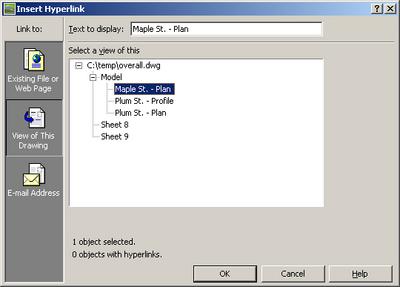
Select the entity to which you want to attach the hyperlink, then use the shortcut "Ctrl+K", or run the properties command, then choose Hyperlink. The following dialog will appear. On the left pane, click "View of this Drawing"
Select the desired model space view or layout name.
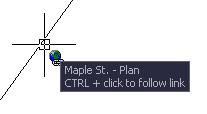
Now when you hover this entity, the little hyperlink icon will be attached to your cursor. Hold the Ctrl key and click to go to this view. You can also right click, choose Hyperlink->Open...
PermaLink Posted 8/16/2005 05:42:00 PM Comments (0)
You can attach a hyperlink to almost any drawing entity, linking it to a named view.
You can even link to layout tabs.
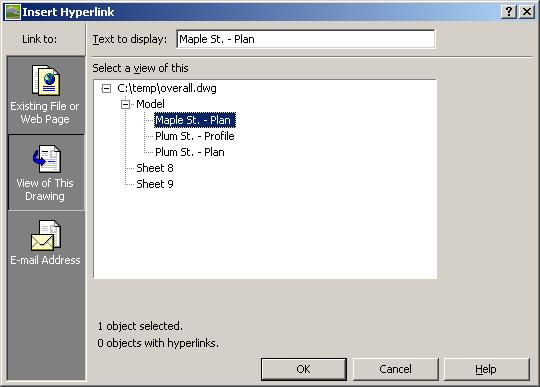
Select the entity to which you want to attach the hyperlink, then use the shortcut "Ctrl+K", or run the properties command, then choose Hyperlink. The following dialog will appear. On the left pane, click "View of this Drawing"
Select the desired model space view or layout name.
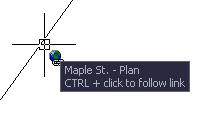
Now when you hover this entity, the little hyperlink icon will be attached to your cursor. Hold the Ctrl key and click to go to this view. You can also right click, choose Hyperlink->Open...
Labels: Tips
PermaLink Posted 8/16/2005 05:42:00 PM Comments (0)